Adding a pricing table to a website is among the most effective ways to reduce customer inquiries and operating costs, which are estimated at $2 to $60 per support ticket across industries.
A pricing table helps you display costs alongside the expected features so clients can pick the option that offers the best value for their money. However, you need to customize your pricing table to match your visitors’ information needs so that they can make their purchase decision while on your website.
In this article, we shall discuss the best pricing table examples, including the psychology behind high-converting pricing layouts and best practices for designing pricing tables.
TL;DR – Pricing Table Examples to Get Inspired
Can’t read the whole article right away? Here are pricing table examples from top brands, and what you can learn from them:
- Shopify: Provides discounts and marks the most popular package to nudge clients towards a specific plan.
- Slack: Highlights reputable brands using Slack to provide social proof for undecided clients.
- HubSpot: Illustrates how to display complex pricing plans without overwhelming clients.
- GitHub: Leverages “The Decoy Effect” to nudge clients to commit to the higher-priced package.
Continue reading for an in-depth review of how to create and customize your pricing table to boost conversions and drive sales.

Why Do Most Pricing Pages Fail to Convert?
Most pricing pages fail to convert site visitors because they create friction during the decision-making process. Once a consumer visits your site and learns about your products or services, their next step is to check out the pricing page to determine:
- If your product or service is worth the cost
- What pricing plan is right for them
- Whether they can trust your business
Unfortunately, most pricing pages make it difficult for customers to make these evaluations by committing the following mistakes:
- Choice Overload: Offering more than 5 pricing tiers can create decision fatigue, leading site visitors to delay or abandon their purchase.
- Complex Features: Displaying a pricing table with technical features that don’t make sense to your target audience often overwhelms visitors and encourages them to look for competitors with simpler pricing packages.
- Lack of Value Hierarchy: Plans that look similar in price and features usually fail to communicate the value and return on investment (ROI) of each tier. Consequently, users struggle to justify the pricing and identify the best option.
- Lack of Transparency: Some businesses do not disclose the prices of their products or services, instead hiding them behind the “Contact Sales” button. While this may work for businesses providing premium services, it often frustrates customers seeking transparency to make informed budgetary decisions.
- Poor User Experience: Static pricing tables that look distorted on smaller screens, like tablets and smartphones, turn off shoppers and drive mobile traffic away from your website.
- Lack of Social Proof: Before a user buys your products or pays for a service, they want evidence that your business is trustworthy. Therefore, not including reviews or testimonials on your pricing page results in missed opportunities for convincing shoppers to trust your offerings.
Solve most design-related issues using a pricing table widget.
Use a pricing table widget to organize packages based on tiers, while maintaining visual hierarchy to guide clients to the “best offer.”
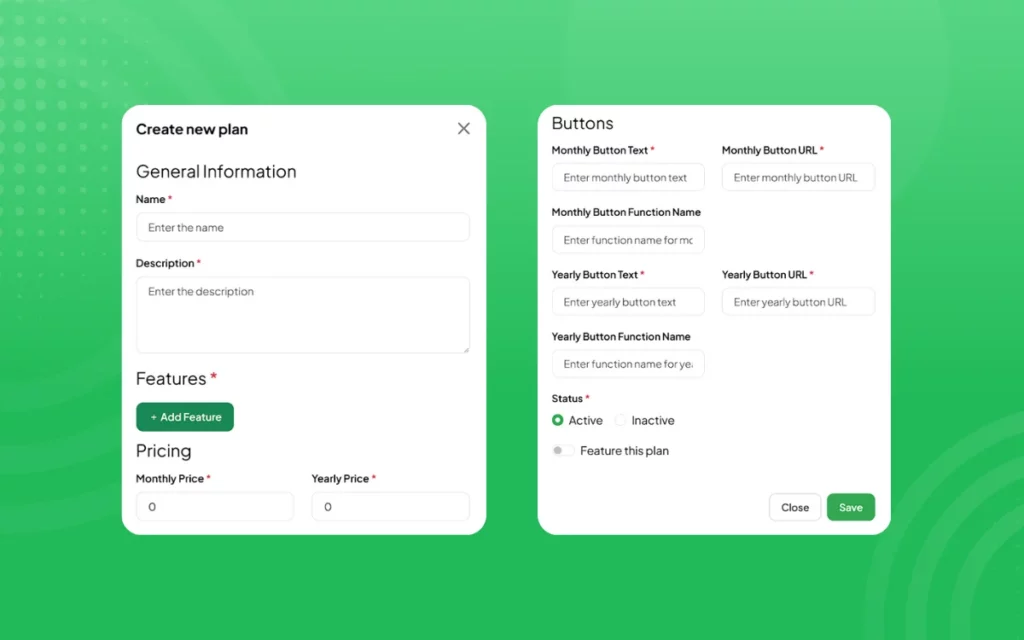
Webynize offers the best widget for creating and personalizing pricing tables that complement your website theme. Our widget uses simple embed codes for easy implementation, especially for users without advanced technical skills. Additionally, the pricing table plugin is compatible with all major web builders, including WordPress, Webflow, and Squarespace, so that you can use the same widget across your portfolio of websites.
Create a widget and join 1000+ small businesses and website owners using Webynize to add high-conversion pricing tables to their sites.
The Psychology Behind High-Converting Pricing Layouts
High-converting pricing layouts often have one common trait: they direct shoppers to the package that makes them feel that they are getting the best value for money.
There are several ways to achieve this:
- The Decoy Effect: In this pricing strategy, you introduce an intentionally less attractive option, “The Decoy,” to nudge users towards your preferred plan. Suppose your pricing table has a Basic tier at $10 and a Pro tier at $20. You could include fewer features in the former, so users naturally gravitate to the latter.
- Anchoring: In this strategy, you present an initially high-priced premium plan, otherwise called “The Anchor,” as the first option. This makes the subsequent, lower-priced plans seem more attractive and valuable to your customers.
- The Compromise Effect: This strategy leverages people’s tendency to gravitate toward the middle option. You offer three pricing tiers, but you highlight the middle tier as the most popular among your clients.
- Charm Pricing: In this strategy, you use prices ending with 9, for example, $9.99, instead of rounded numbers such as $10. It exploits a cognitive bias called the “Left-Digit Effect,” in which consumers focus on the first digit of a price, which makes $9.99 seem significantly lower than $10.
- Social Proof: People are more likely to purchase if they see others have made the same purchase. An effective strategy is to add a social proof widget to your website that shows several customers have purchased a premium plan moments ago.
- Scarcity and Urgency: In this strategy, you let your users know how close they are to missing out on a great deal, creating ‘the fear of missing out’ (FOMO). For example, you could add an announcement widget to your website to display a limited-time discount on a pro plan to create urgency.
Pricing Table Best Practices That Increase Sales
An effective pricing table will help you boost your company’s sales by clearly highlighting the available options, reducing visitors’ cognitive load, and decision fatigue.
Below are some proven tips for creating high-converting pricing pages:
- Limit the Available Options: Display only three or four plans, with three being ideal. Such tables help users compare plan offerings without feeling overwhelmed. Consequently, it hastens the user’s decision-making process and improves conversion rates.
- Highlight the Best Plan: Use design cues like colored backgrounds, larger card sizes, varied border styles, and badges to guide users’ attention to the best package.
- Use Clear Value Propositions: Instead of focusing solely on your products’ or services’ technical specifications, highlight the benefits of each pricing tier. You could even add a tooltips widget to provide additional context/explanation when visitors hover over a plan.
- Include Social Proof: Use trust signals to reduce users’ perceived risk. Examples include offering money-back guarantees, earning security certifications, and featuring customer logos.
- Simplify Comparisons: Use vertical, side-by-side columns to highlight the features available in each pricing tier. You can use checkmarks or other symbols to indicate the specifications included in each plan, making it easier for your users to skim the content.
- Offer Annual Discounts: Annual plans increase upfront cash flow, improve revenue predictability, and reduce churn by allowing your users to realize the value of your products or services over a longer period. For example, your standard monthly plan could cost $39, while the annual plan could cost $34 per month, billed annually, saving your customers $5 each month.
Pricing Table Examples From Top Brands
Top brands don’t just pick random pricing table designs; they test and refine them until they are optimized for conversion. The best pricing tables account for layout designs, visual hierarchy, and content curation to nudge customers to commit to a paid plan.
Below, we have compiled pricing table examples from top brands to inspire you:
1. Shopify
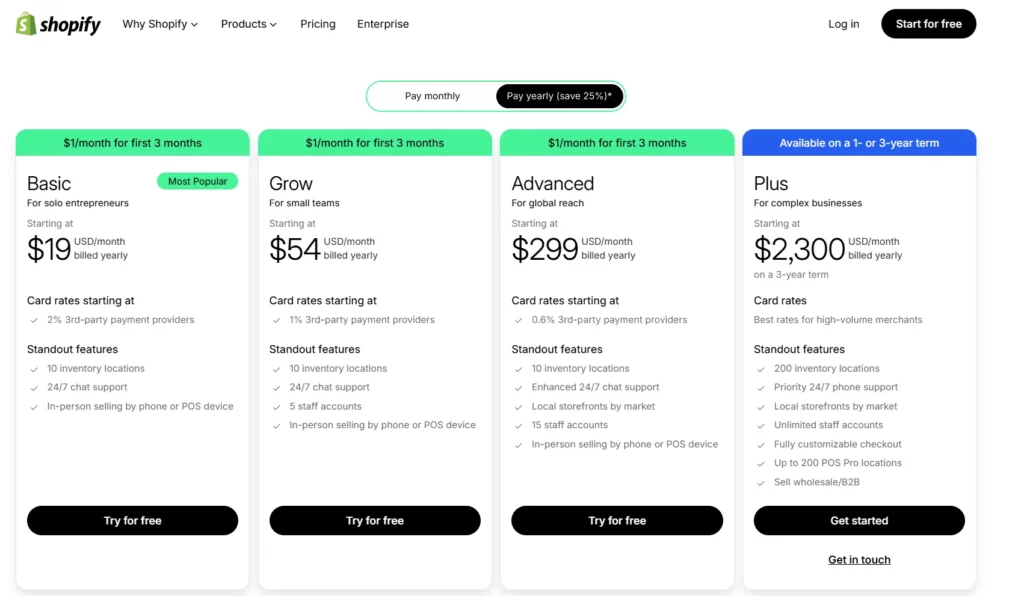
Shopify uses a clear, straightforward table with 4 plans. It includes standout features and strong CTA buttons, with the monthly price displayed in a large font.
The price discounts at the top of the table help grab visitors’ attention and encourage them to commit to annual plans.
Additionally, the Basic plan has a “Most Popular” tag to help it stand out as the best value for money.
2. Slack
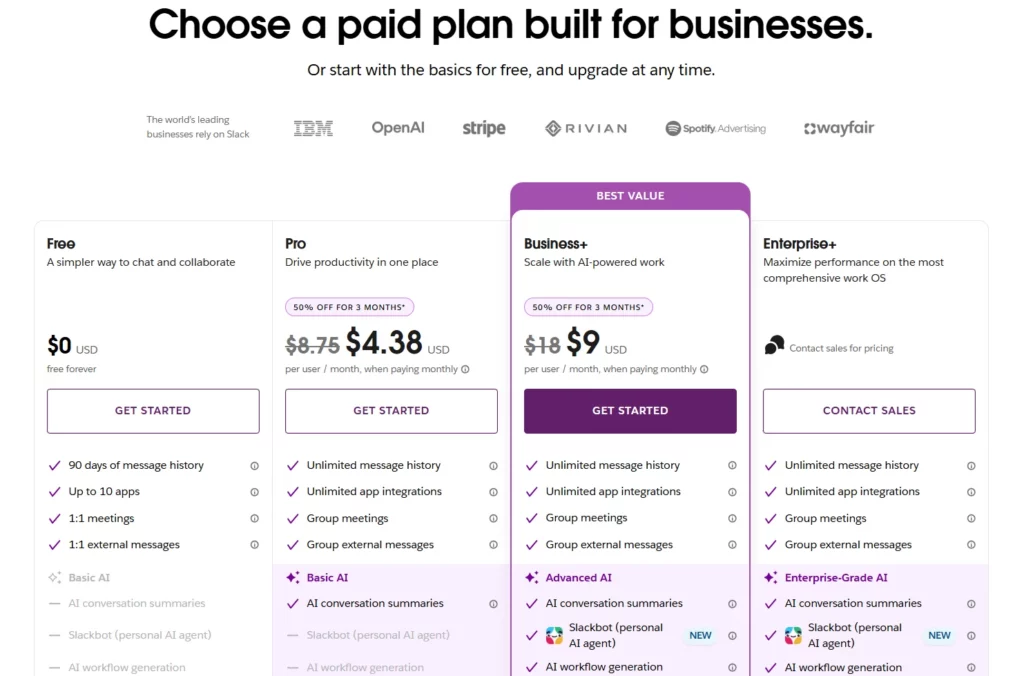
Slack has 4 pricing tiers in a vertical table format. The pricing tables include a free tier and highlight the best value plan.
The tables also have checkmarks indicating the features available in each tier and prominent CTAs.
Above the tables is a section highlighting the companies that use Slack, which provides invaluable social proof for the brand and its offerings.
3. HubSpot
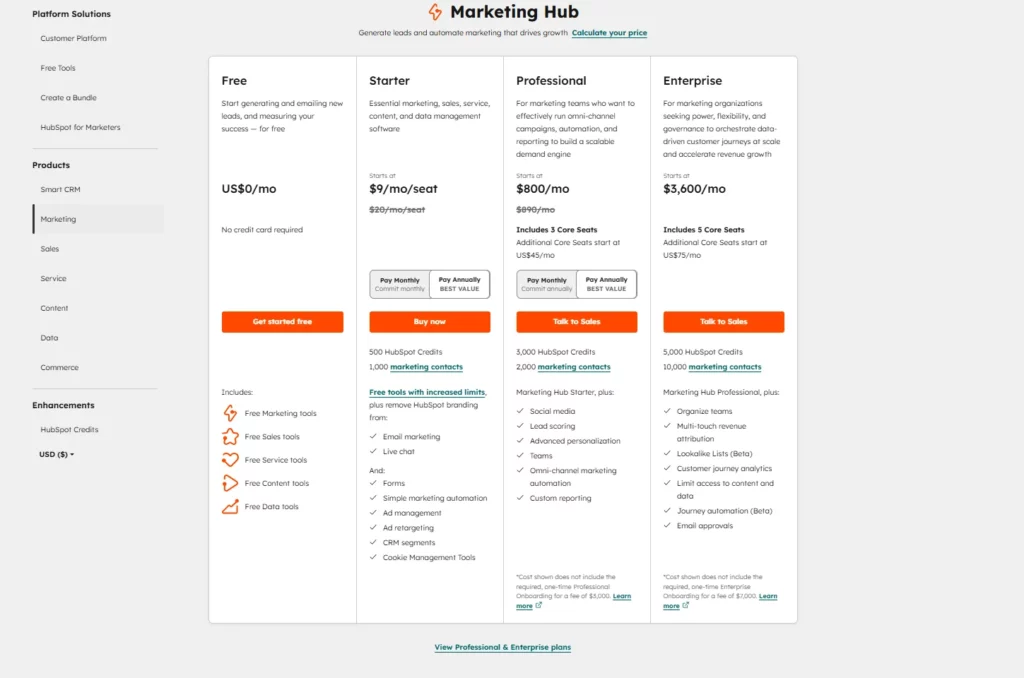
Although HubSpot’s pricing page is more complex due to its multiple products, it navigates the complexity well.
It does so by offering segmented pricing categories that you can navigate via a panel on the left side of the screen. The pricing tables have interactive comparison tables, expandable features lists, and prominent CTAs.
4. GitHub
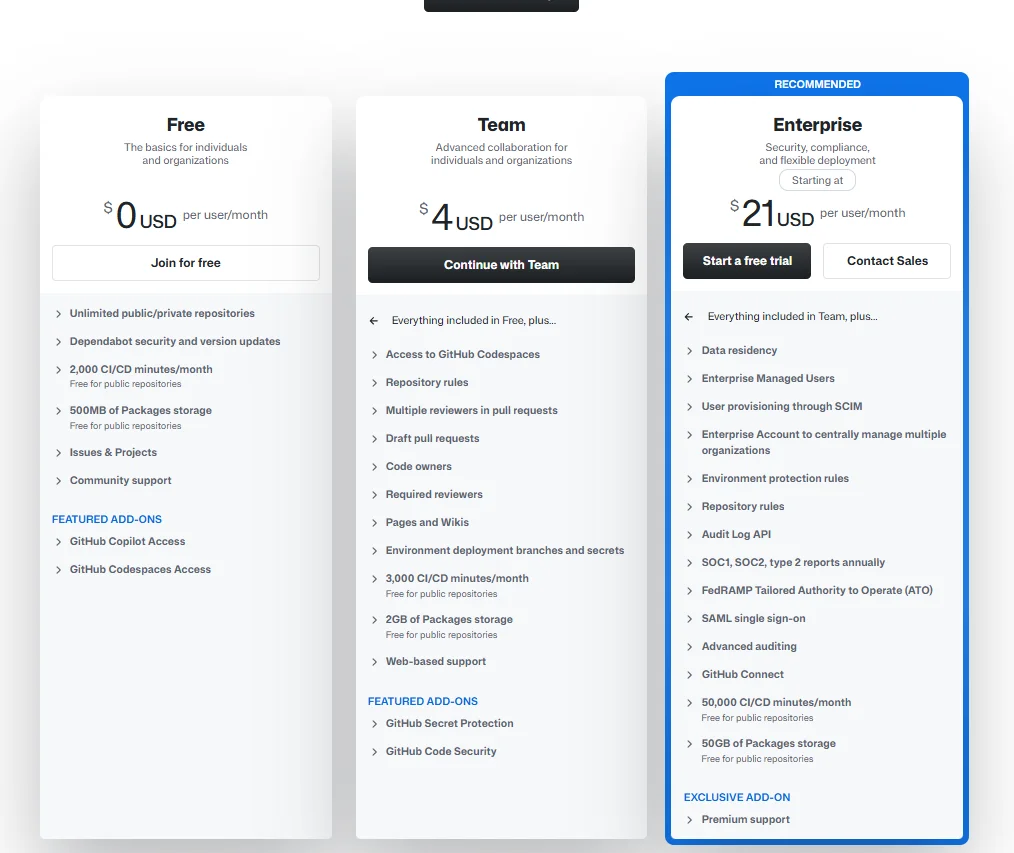
GitHub has a 3-tier pricing list that utilizes “The Decoy Effect” to drive conversions. It offers a cheaper Team package at $4 per user/month, but with very limited features. This helps nudge potential clients to commit to the Enterprise plan, which offers premium features but costs more than five times as much.
Additionally, GitHub uses visual cues, such as highlighting the Enterprise plan in a different color and including the “Recommended” tag, to promote the package as the best value for money.
How to Choose the Right Pricing Model for Your Business
Choosing the right pricing model is just as important as designing your pricing tables. Remember, a well-designed pricing table may help you grab shoppers’ attention, but it is the perceived value for money that convinces them to commit to a plan.
Below are the factors to consider when choosing a pricing model:
- Calculate Your Production Costs: Determine how much you spend to produce one unit of your product or service. This provides the baseline for setting your selling price.
- Analyze Your Current Pricing Structure: Evaluate the existing pricing structure to identify its strengths and weaknesses, including its impact on conversions.
- Evaluate Competitor Pricing: Review industry trends and competitors’ pricing models to identify your unique selling points and inform your pricing strategy.
- Consider Your Market Position: Is your business a market leader in your sector or a challenger? If you are a market leader, consider a premium pricing model that charges higher prices for the uniqueness of your products or services. Conversely, if you are a challenger, consider the penetration pricing model that sets entry-level prices intentionally low to disrupt the market.
- Conduct Market Research: Interview customers to establish their perceived value of your products or services and how much they are willing to pay.
- Evaluate Your Implementation Capabilities: Ensure your business has the resources to implement the pricing model you choose before you reach the implementation stage. That includes personnel and technology, such as software and hardware, to help you track pricing.
- Select a Pricing Plan: Analyze the information you gathered, including operational costs, market trends, and customer sentiment, and choose the model that ensures consistent revenue and profitability, while also keeping you competitive.
- Implement and Monitor the Pricing Model: Launch the pricing model and monitor performance based on internal sales metrics, economic shifts, market trends, competitor behavior, and customer base trends. Use the insights to refine your pricing model to maximize conversions.

Frequently Asked Questions (FAQs)
Below are answers to common questions about pricing tables.
How Many Plans Should a Pricing Table Include?
There is no limit to the number of plans a pricing table should include. However, the rule of thumb is to include 3 to 5 plans to give your potential clients options without overwhelming them.
Should I Show Annual and Monthly Pricing Together?
Yes. You should display both annual and monthly pricing side-by-side, with a toggle that lets users switch between them.
Showing both options caters to customers’ purchase preferences: some prefer monthly plans, while others prefer annual subscriptions.
What Features Should I Display In a Pricing Table?
A pricing table should focus on the features that are most important and useful to your users. For example, it should contain plan names, key differentiators between plans, pricing tiers, usage limits, customer support levels, security features, and a prominent CTA.
Avoid listing unnecessary technical features that may confuse your customers.
Conclusion
A pricing table helps you influence how customers perceive the value of your products and services and how they make purchase decisions. Therefore, it is vital to design a table that not only presents options but also provides clarity among the different packages.
However, you need a plugin that gives you autonomy over how you customize your pricing table, so that it blends with your brand theme and caters to your target audience’s information needs.
Webynize leverages 10+ years of SaaS and web development experience to design a user-friendly pricing table widget that is easy to set up and customize, even for beginners. Additionally, the widget is mobile-optimized to deliver a consistent UX across devices.
Create a widget that displays an engaging pricing table to encourage potential clients to commit to their preferred plans.
Leave a Reply