Need a quick way to add an Exit-intent popup on your website? Our Webynize widget lets you create and customize your Exit-intent popup without writing any code, making it user-friendly for users with limited web design proficiency. Also, we have a responsive support team to help address any embedding issues you might encounter.
Create a Webynize widget today and leverage Exit-intent popups to encourage visitors to stay on your website longer!
Add Exit-intent Popup Widget to Website – Step by Step
Follow our complete guide below to add an Exit-intent Pop on your website for free. The first part covers how to set up our Webynize widget and the second part explains how to add it to your website.
Creating a Webynize Exit-intent Popup Widget
Here’s an in-depth guide for setting up and customizing a Webynize Exit-intent Popup widget:
- Sign up for Webynize for free and unlock our 7-day free trial. You can display the Exit-intent Popup widget on your website for free during this period, before committing to a paid plan.

- Click the +Create Widget button to go to our Webynize widget library.
- Select the Exit-intent Popup on the widget dropdown menu.
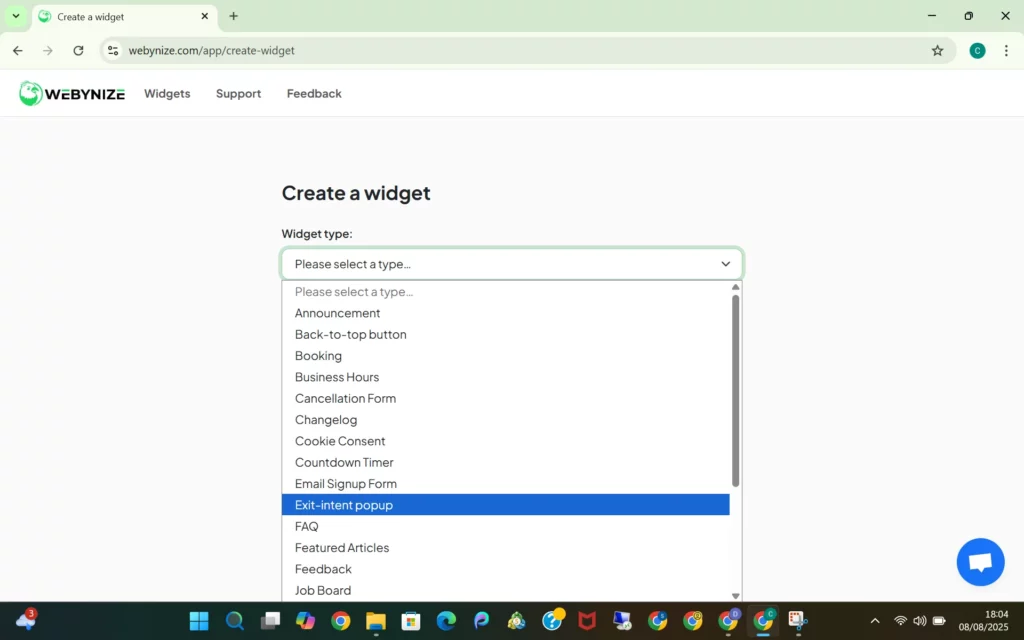
- Input a placeholder name for your widget and click Next to go to the editor panel.

- Design your Exit-intent Popup by inputting the title and content texts depending on the intended use. Check the Exit-intent Popup examples in the sections below for inspiration on how to design your widget.
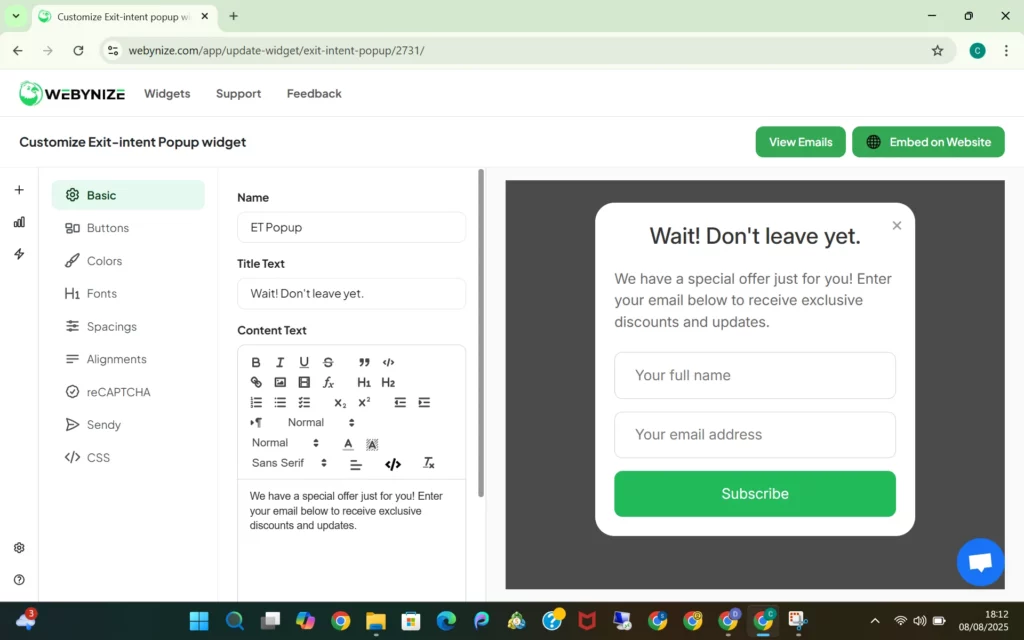
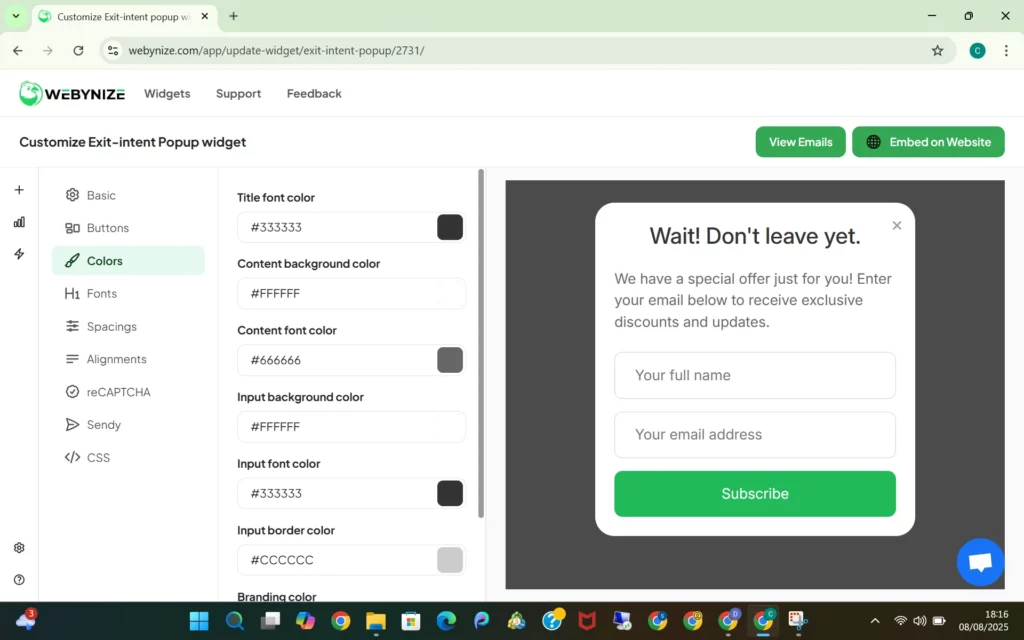
- Personalize the Exit-intent Popup widget to complement your website’s design and theme. You can select custom colors for the popup’s background, button, and text to make your widget stand out. Click the Save button to apply the changes.
- Click Embed on Website and specify your web builder.
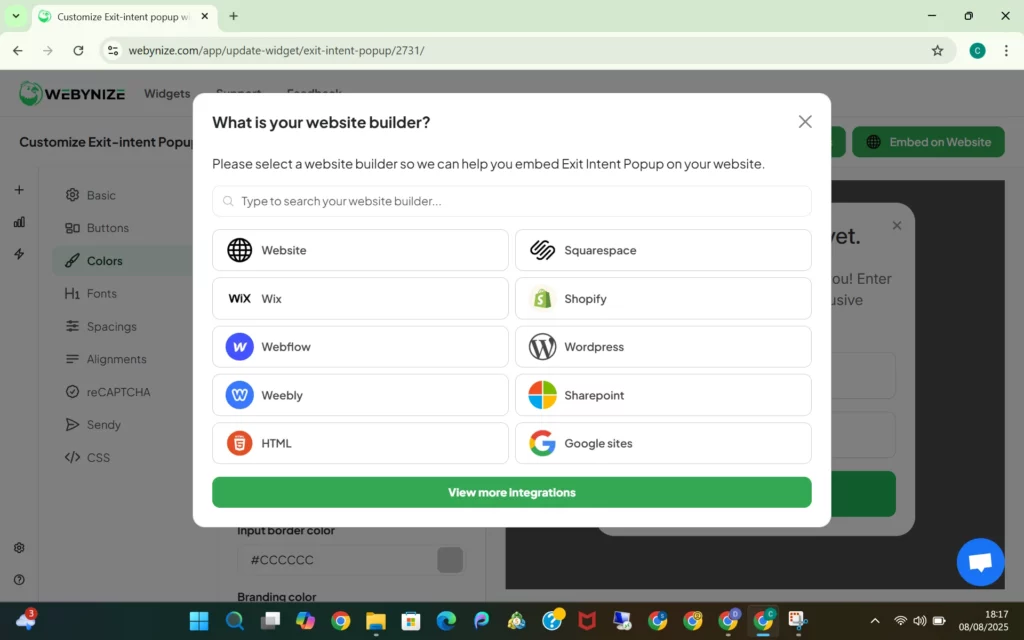
- Copy the JavaScript code that appears on the popup.

Add the Exit-intent Popup Widget to Your Website
Next, let’s outline how to embed the Exit-intent Popup widget on your site:
- Go to your website administrator dashboard and open the web pages where you want to add the popup feature.

- Launch the code editor, rich text editor, or code block section, depending on the website builder you are using.

- Paste the JavaScript code you copied from our Webynize embed code generator.
- Save the changes, then click on Publish so the features go live.
Webynize is the go-to Exit-intent popup widget for website owners experiencing low conversion rates and high bounce rates. You could also use it to collect customer feedback and grow your online reviews for social proof.
Sign up for Webynize and join thousands of small businesses and website owners using our widget to boost visitor engagement.
Video Guide: Embed an Exit-Intent Popup Widget on Your Website for Free
Follow our YouTube video guide below for an in-depth guide on how to add an Exit-intent Popup widget to your website.
What Is an Exit-Intent Popup and How Does It Work?
An Exit-intent popup is a window or overlay that appears when visitors are about to leave (‘show intent to exit’) a website or switch to another tab.
Usually, it displays an offer to draw visitors back to your website and entice them to continue engaging with your content.
Here’s how an Exit-intent popup works:
Suppose you run an ecommerce website, and a visitor engages with a specific product page for several minutes. This likely means that they like your product and would consider buying it.
Now, suppose the potential lead decides to leave your site and return later to make the purchase. You can leverage an Exit-intent pop-up to offer a limited-time discount coupon to create urgency and nudge the visitor to make their purchase decision while still on your website.

Popular Use Cases for Exit Intent Popups
Website owners often ask, “How can I get the most value from Exit-intent popups.” Well, here are some scenarios where you could leverage Exit-intent popups to boost website engagement or for lead generation:
- Email or Newsletter Subscription: Create an Exit-intent popup requesting website visitors to join your email list or sign up for your newsletter. Highlight your value proposition, such as access to exclusive discounts.
- Lead Magnets: Offer freebies like free templates, guides, and calculators to regain visitors’ attention and entice them to stay on your website longer.
- Feedback Collection Forms: Display a short survey asking visitors to rank your products or even share their user experience on your website.
- Limited Time Offers: Use the Exit-intent popup to highlight limited-time deals or offers to visitors with open carts to reduce abandonment rates.
- Related Products: Highlight other items related to the products that website visitors are interested in. Suppose a user was browsing fitness smartwatches. Related products would include sportswear and water bottles.

Why Exit-Intent Popup Tools Are a Game Changer
Below are the key advantages of adding an Exit-intent popup on your website:
- Grow Your Email List: Lead magnets like free ebooks and templates help entice visitors to join your email list.
- Boost Conversions: Displaying exclusive offers and discount coupons on the Exit-intent popup nudges shoppers to make their purchase decision while still on your site, increasing your sales.
- Increased Website Engagement: You could leverage the Exit-intent popups to direct visitors to other web pages that might pique their interest, encouraging them to spend more time on your site.
- Collect Customer Feedback: Exit-intent popups are effective for collecting Google reviews or other customer testimonials to provide social proof for your brand.

[LIVE-DEMO]
[TESTIMONIALS]
Best Practices for Exit Intent Widgets
Creating an Exit-intent popup widget is only one part of the job. You must also optimize the widget to grab visitors’ interest quickly and encourage them to interact with the popup. Use our cheatsheet below to maximize visitor engagement on your website:
- Personalize the Widget: Customize the Exit-intent popup, especially the colors, so it blends with your website. Alternatively, you could use contrasting colors to make the widget stand out.
- Be Clear and Concise: Use short sentences and white spaces to enhance readability. Also, limit the content on the Exit-intent popup to only a few sentences (max of 3).
- Offer Exchange Value: Quickly state what visitors stand to gain from completing the target action. For example, users could sign up for your email list or newsletter in exchange for free templates.
- Include a CTA: Craft a compelling call-to-action statement guiding visitors on the next steps. For example, you could urge shoppers to ‘Sign up and unlock a 20% discount on your next order!’
- Run A/B Tests: Create and publish several versions of the Exit-intent popup, and then monitor to see which option drives the most visitor engagement.
Exit Intent Popup Examples to Inspire You
Ready to set up your Exit-intent popup but don’t know how to style it? Check out these examples created using our Webynize Exit-intent popup widget for inspiration.
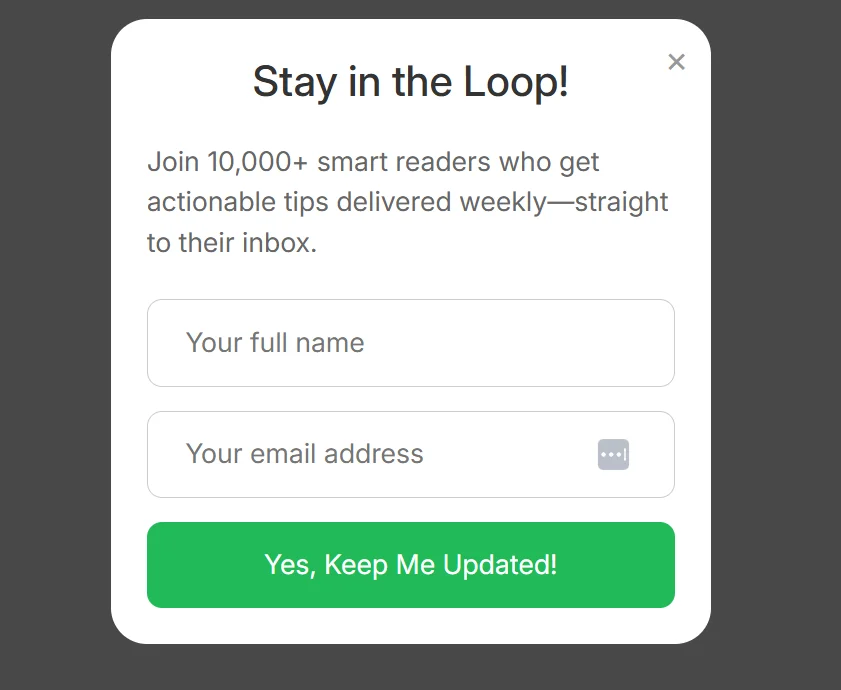
1. Newsletter Signups
Create a simple Exit-intent popup inviting your website visitors to subscribe to your newsletter. It could be for product-related how-to guides or exclusive offers and deals.
2. Lead Magnets
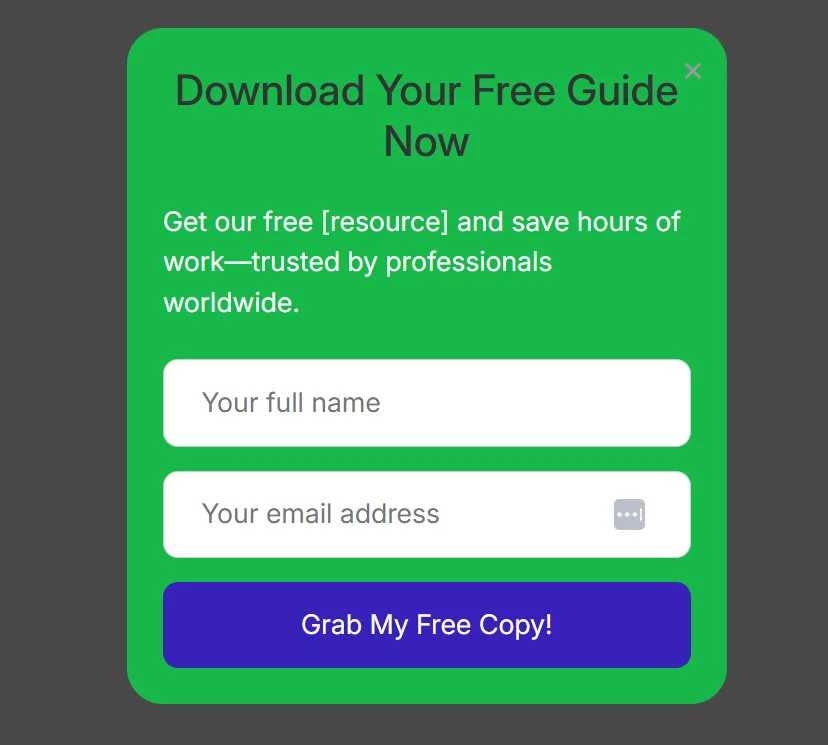
Freebies like templates, calculators, reports, and research papers effectively attract visitors interested in your offerings. You can configure the Exit-intent popup so visitors who sign up can receive the free resources in their mailboxes.
3. Discount Coupons and Offers
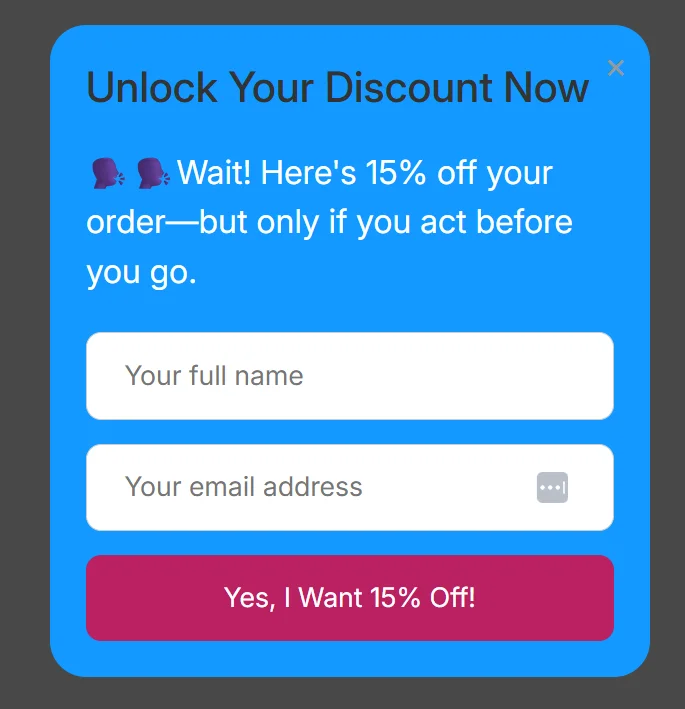
Are shoppers abandoning their carts midway through, costing you potential sales? Consider adding an Exit-intent popup offering sales discounts and coupons to get shoppers excited and nudge them to place their orders.
Below is an example of how to design a simple Exit-intent popup to help you drive your sales.
Need Support?
This tutorial has helped show you how to add an Exit-intent popup widget to your web project for FREE!
If you still have questions about the integration process, our team is happy to help.
Hop on a live chat with our support team by clicking the chat icon on the bottom right of your screen.
Should we be offline, contact us through [email protected]. We’ll get back to you as soon as possible.
Frequently Asked Questions (FAQs)
Let’s wind up our discussion by answering commonly asked questions about exit intent popups.
Do Exit Intent Popups Work on Mobile Devices?
Yes. Exit intent popups work on mobile devices but rely on different signals than when browsing on a PC, such as upward scrolling and back button presses.
How Often Should I Show Exit Popups to Visitors?
There’s no limit to the number of times you should show exit popups to visitors. However, we recommend displaying the popup once per session, as frequent popups could hurt your website’s user experience.
What’s the Best Timing for an Exit Intent Popup to Appear?
The best timing for an exit intent popup to appear is when a user’s behavior suggests they are about to bounce from your website. Common exit intent signals include:
- The mouse rapidly moves toward the browser bar area.
- Prolonged periods of inactivity.
- Clicking or tapping (on mobile) the Back-to-Top button.
Can I A/B Test Different Exit Intent Popups?
Yes. You can A/B test different exit intent popups using tools like Google Analytics, Omniconvert, and Picreel to find the one that works best for your website.
Conclusion
Adding a Exit-intent popup widget can be a simple and effective way to gather valuable insights from your customers and improve the overall user experience of your web project.
Our Webynize widget lets you design and personalize an Exit-intent popup that attracts visitors’ attention quickly and helps reduce your cart abandonment rate. Also, the widget is compatible with major website platforms like Webflow, Bubble, and Squarespace.
Create a Webynize widget for a simple, yet effective way to reduce your website’s bounce rate.
We wish you the best of luck with your new Exit-intent popup widget!
Leave a Reply