
Adding a cookie consent pop-up on a website solely for legal compliance is quickly becoming outdated. As a website owner, you should view your cookie consent banner as part of your website’s core design elements and as an opportunity for visitor engagement.
A well-designed cookie consent pop-up grabs attention quickly by engaging visitors on the type of data you collect, which helps build trust.
In this guide, you’ll learn the best practices for designing your cookie consent pop-up, core elements of a good pop-up management system, and creative ways to showcase the banner on your website.
TL;DR – Cookie Consent Popup Best Practices
Can’t read the whole article right away?
Here are some practical tips for designing your cookie consent pop-up to maximize functionality and visitor engagement:
- Display the cookie consent pop-up on the first page only.
- Ensure mobile-friendliness.
- Position the pop-up strategically to boost engagement.
- Load the consent pop-up early.
- Use clear language.
- Explain what the proposed cookies do.
Keep reading for an in-depth discussion of each best practice, including how it impacts your website’s UX.

What Makes a Cookie Consent Popup Compliant?
Creating a cookie consent pop-up and adding it to your website doesn’t automatically make you compliant.
The pop-up should meet various thresholds for legality, including the following:
- Active Consent: Visitors must have complete control over whether they consent or don’t consent to the suggested cookies. As such, avoid design elements like pre-checked boxes or invisible reject buttons.
- Cookie Categories: Give visitors granular control so they can choose which types of cookies they consent to, rather than an all-or-nothing option.
- Simple Language: Use easy-to-understand language so that visitors know precisely what they are consenting to. Cookies with technical jargon could be an underhanded tactic intended to dupe visitors into consenting.
- Easy Consent Withdrawal: Visitors who previously accepted various cookies but now want to withdraw their consent should be able to do so without jumping through hoops. For example, you could have a link to a web page where visitors can adjust their personal preferences.
Cookie Consent Popup Legal Requirements by Region
Cookie consent compliance varies across jurisdictions. This means a cookie deemed compliant in California may violate GDPR in EU countries like Germany and France. Similarly, a mandatory opt-in cookie in Europe could be considered redundant in parts of the U.S.
Given the differences in cookie consent pop-up legal requirements, website owners must understand how the regulations vary across regions.
Let’s discuss the legal requirements by region:
- European Union (EU): The EU is governed by the General Data Protection Regulation (GDPR), which many data security experts consider the gold standard for cookie consent legal requirements. The GDPR requires explicit opt-in consent before collecting visitors’ data for third-party use. Additionally, website owners must give visitors granular control over cookie categories with equally prominent accept and reject options.
- United Kingdom: Following Brexit, the UK is no longer considered a part of the EU. Consequently, they have their own set of rules, with websites required to comply with the UK GDPR. However, there are very few differences between the UK GDPR and EU GDPR, with the former also requiring prior opt-in consent for non-essential cookies and equal “Accept” and “Reject” buttons.
- United States: Unlike in the EU or the UK, there are no federal laws that impose universal cookie consent requirements nationwide in the U.S. Each state has the autonomy to govern how websites collect users’ data for third-party use. The most notable ones are the California Consumer Privacy Act (CCPA) and the Connecticut Data Privacy Act (CTDPA), which require businesses to notify visitors about data collection and provide an easy-to-understand opt-out mechanism.
- Canada: In Canada, cookie consent falls under the Personal Information Protection and Electronic Documents Act (PIPEDA), which requires website owners to disclose the purpose of data collection and to obtain visitors’ consent to store their personal information. However, unlike GDPR, website owners may store data with implied consent if users are clearly informed and have reasonable opt-out options.
- Australia: Unlike other regions with explicit cookie consent legal requirements, Australia doesn’t regulate cookies; instead, it sets provisions for collecting and storing personal information. This requires businesses to explain cookie usage and obtain consent when collecting sensitive information.
Essential Features of Effective Cookie Consent Management
The best cookie consent pop-ups balance regulatory requirements with user experience to keep visitors engaged and increase dwell time.
Here’s what separates a good vs. excellent cookie consent implementation:
- Geo-Targeting: Your cookie consent platform should automatically detect visitors’ locations and personalize the text for their regions, including displaying the appropriate consent models, such as GDPR opt-in vs. CCPA opt-out.
- Consent Preference Memory: A good cookie consent management system stores your visitors’ choices, so returning visitors don’t keep encountering the pop-up, as this can increase bounce rates.
- Automatic Cookie Blocking: Your cookie consent platform should keep non-essential cookies inactive until users approve them. Avoid using cookies that store users’ data under the assumption that visitors will consent, as this violates most data privacy laws and could result in legal liability.
- Consent Log Documentation: A good cookie consent management system should record when consent was given, which categories visitors approved, IP addresses, and timestamps.
- Accessibility: Your cookie consent management should account for the needs of visitors with sensory impairments. For example, your cookie consent pop-up should be compatible with screen-readers and display readable text with accessible buttons.

Creative Ways to Display Cookie Consent Popup
Your cookie consent pop-up doesn’t have to be plain and boring; you can style it to fit your visitor engagement strategy.
Some design styles to consider include:
- Minimalist Layout: Design the consent pop-up as a floating box in the bottom-left or right corner of your website, allowing uninterrupted scrolling. Alternatively, you could use a thin bar that spans the footer or header to quickly grab visitors’ attention when they open your website.
- Playful Themes: Use themed graphics like cartoon cookies or icon-based toggles to engage visitors and obtain consent without making the pop-up feel annoying.
- Branded UX: Customize the cookie consent pop-up to match your website’s theme, including the color, font, and border style. Alternatively, you can use a full-screen, transparent overlay that lets visitors interact with the cookie consent pop-up while your website remains visible in the background.
- Contextual Layout: Use dynamic templates that let you personalize the pop-up to visitors’ context, such as tailoring consent messages based on users’ geo-location. Additionally, you could design your consent pop-up similar to an exit-intent pop-up widget, where a small modal appears at the center of the screen when visitors are about to leave your website. However, such designs are only valid for “remember me” or “save my cart” cookies.
Best Practices to Use Cookie Consent Popup
A well-designed cookie consent pop-up goes beyond compliance. It creates opportunities for visitor engagement, which helps increase your site’s dwell time.
Some consent pop-up design tips to consider for better UX include:
Display on the First Page Only
Show the cookie consent pop-up only once per visit, and not on every web page. Additionally, you should remember users’ selected preferences, so that you don’t prompt them on every visit.
Constant interruptions hurt your website’s UX. It may also increase bounce rates, as website visitors are more likely to leave your website than deal with recurring pop-ups.
Ensure Mobile-Friendliness
Over 60% of website traffic comes from mobile users, making mobile-first design a non-negotiable when optimizing design elements.
That’s why your cookie consent pop-up should have responsive layouts and touch-friendly buttons for easy navigation across different screen sizes.
Position the Popup Strategically
Place the pop-up at the bottom of your screen or as a partially transparent modal so visitors can still view your website content before consenting to cookies.
Full-page overlays that obscure everything can create immediate friction with first-time visitors, leading some to bounce.
Load the Consent Popup Early
Unless it’s for exit-intent cookies, ensure the consent mechanism loads first in your page sequence. This prevents illegal data collection during the seconds between page load and pop-up display.
Early loading also prevents incidents where visitors are already interacting with your website and are then interrupted, which could increase bounce rates.
Use Clear Language
Explain how each cookie helps improve visitors’ UX in a simple, easy-to-understand language, to encourage opt-in.
An example of a simple description for an analytics cookie would be:
- Analytics Cookies: We collect anonymous data on traffic, page views, and user behavior to help us understand how you interact with our website and improve our performance.
However, avoid using salesy or coercive language to stay compliant with GDPR.
Provide Context
Explain what each set of cookies does, and the impact on user experience. You can add a tooltips widget to your website to provide additional information when visitors hover over the cookie consent banner.
Visitors are more likely to consent when they understand the data you will store and how you’ll use it.
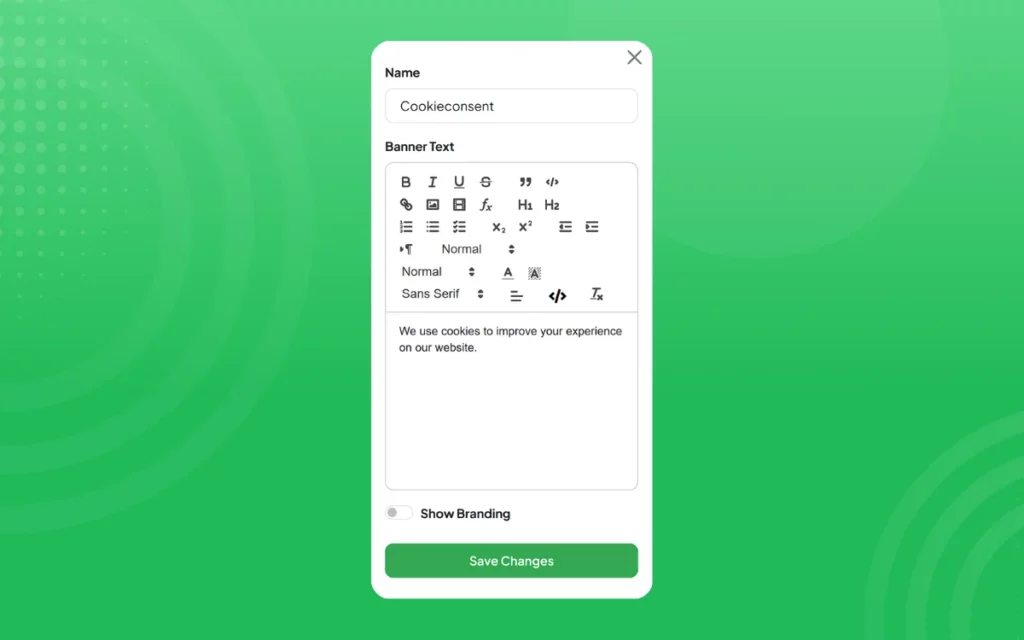
Use Webynize to Create Custom Popups Without Coding
Creating a cookie consent pop-up for your website can be hectic if you lack advanced web design skills. A more straightforward approach would be to use a website widget.
Webynize offers a beginner-friendly widget that lets you set up a pop-up and personalize it to your website without writing any code.
Below is a complete guide to adding a cookie consent widget to your website.
Creating a Cookie Consent Widget on Webynize
Here’s a simple guide for generating cookie consent embed code:
- Sign up for Webynize.

- Use the +Create Widget button to open the Webynize widget library.
- Open the dropdown menu and select the Cookie Consent widget.

- Input a custom name for your widget and click Next to go to the editing panel.
- Provide a concise message for your cookie consent banner that explains the purpose of the collected data.
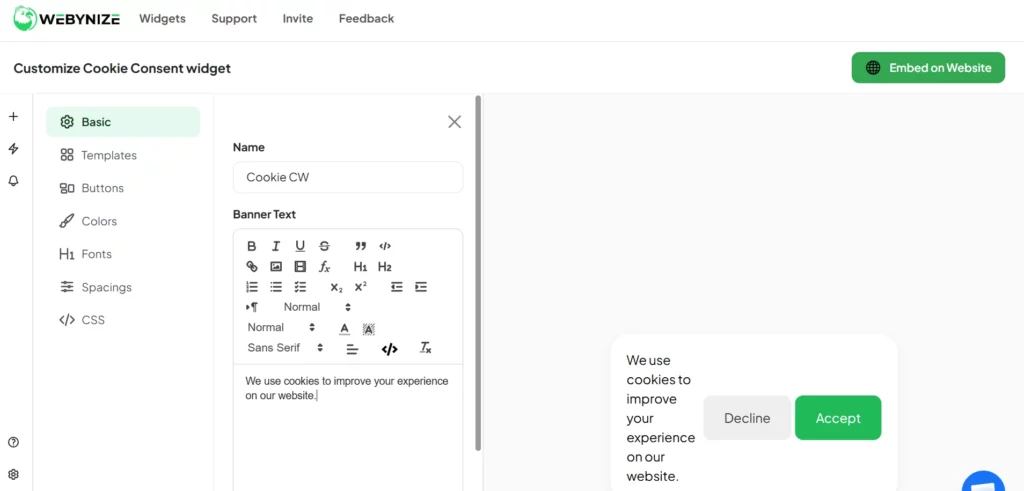
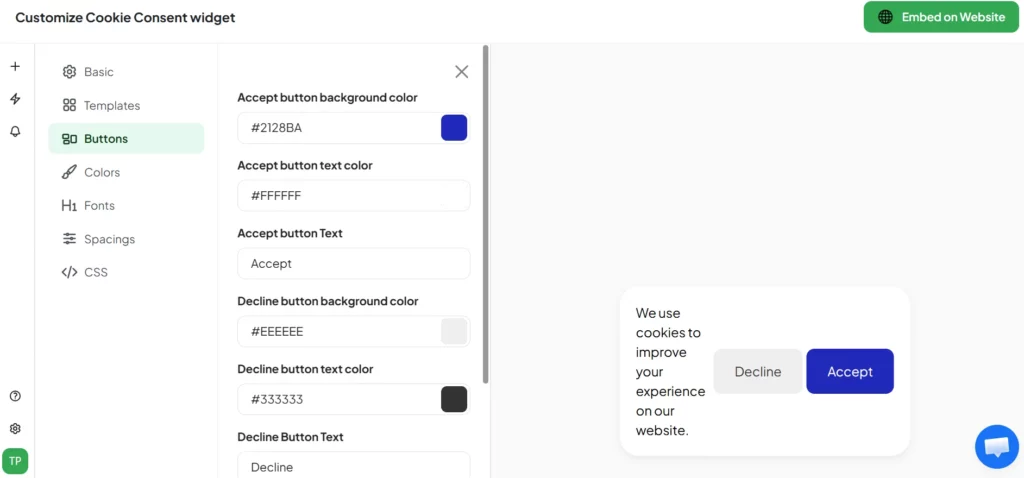
- Use the tabs on the left of the editor panel to customize the widget’s appearance, including the font type, background theme, and button colors.
- Click Embed on Website and specify your web platform.
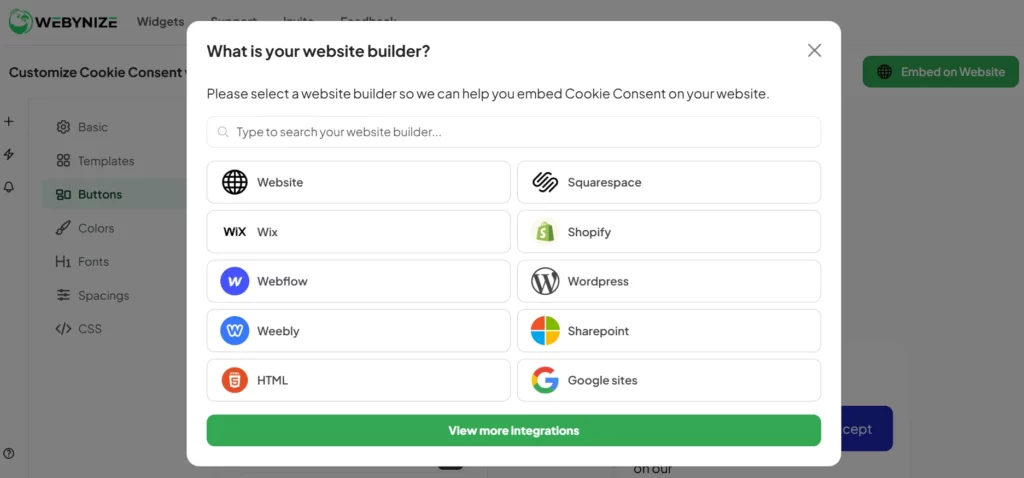
- Copy the script that appears in the pop-up window.
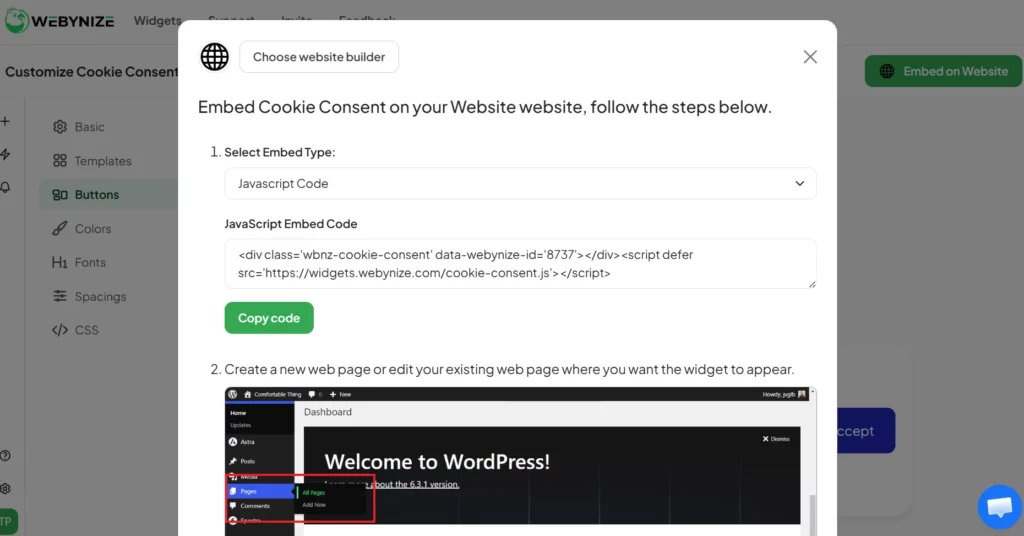
Adding the Cookie Consent Widget to a Website
Now that you have the embed code, it’s time to add it to your website:
- Log in to your website’s admin panel.
- Open the web page where you want the cookie consent widget to appear.

- On that web page, create a new code block or rich text editor, depending on your web builder.

- Paste the script you copied from Webynize.
- Save the changes and publish the web page.
The cookie consent widget will now be live on your website.
Enjoy flexible customization options that let you style your cookie consent widget to complement your website’s theme and quickly grab visitors’ attention. Our widget is dynamic and adapts to different screen sizes, helping make your website mobile-friendly.
Create a cookie consent widget today for a seamless way to make your website compliant.
Frequently Asked Questions (FAQs)
This section answers common questions about cookie consent pop-ups:
What is the Difference Between Consent and Preference Cookies?
Consent cookies are mandatory for legal compliance, while preference cookies are intended to enhance visitors’ UX on a website.
For example, consent cookies allow website owners to collect visitors’ data for third-party use, like analytics and marketing. In contrast, Preference cookies store user settings such as language, region, and UI configuration, so that visitors don’t have to set them every time they return to a website.
Can Cookie Consent Pop-up Affect SEO Ranking?
Yes. The cookie consent pop-up can affect SEO ranking, though indirectly.
For example, a static pop-up is often difficult to interact with on smaller screens, which signals to search engines that your website is not mobile-friendly and could hurt your rankings.
How Often Should Websites Update Cookie Policies?
There’s no limit to how often you should update cookie policies.
However, the rule of thumb is to review your policies every few months to keep them up to date with regulations or after a significant design overhaul.
Are Cookie Consent Popups Mandatory for All Websites?
No. Cookie consent popups aren’t mandatory for all websites.
However, website owners must comply with the standards if their sites are accessed from jurisdictions where the regulations apply, such as the EU.
What Happens If Users Decline Cookies Completely?
Users who decline cookies entirely often don’t want websites to store any of their information.
As a website owner, it is in your best interest to respect such visitors’ choices to avoid legal liability that could result in fines or a tarnished brand image.
Conclusion
Adding a cookie consent pop-up offers a simple way to keep your website compliant and enhance visitor engagement. However, you need a widget to simplify the integration process, especially if you are not a proficient web developer.
Webynize builds on 10+ years of SaaS and web dev experience to create a cookie consent widget with simple embed codes for easy implementation. Additionally, our widget is compatible with all major web platforms, including Squarespace, Wix, and Webflow, meaning you can use it across your websites.
Create a widget and display a cookie consent banner that adapts to every regulation without slowing your site down.
Leave a Reply