
Welcome to our tutorial on how to add a Email Signup Form widget to your web project.
Grow your audience and drive conversions effortlessly with our Email Signup Form widget, designed to capture valuable leads and nurture lasting customer relationships.
Whether you want to improve user experience or create a more interactive website, a Email Signup Form can be valuable. This article will walk you through integrating our Email Signup Form widget into your web project.
But if you can’t read the whole article right now, and only need a quick solution for adding an Email Signup Form to your website, use Webynize.
Our widget has a built-in code generator that lets you bypass the coding step and go straight to personalizing your Email Signup Form. Also, our support team is always on standby to help you address arising integration issues.
Create a Webynize widget and enjoy the convenience of adding an Email Signup Form on your website without coding!
Add Email Signup Form Widget to Website – Step by Step
This section provides in-depth guides for creating an Email Signup Form using our Webynize widget and how to add it to your website.
Creating a Webynize Email Signup Form Widget
Follow these steps to create and customize your Email Signup Form on Webynize:
- Sign up for our Webynize 7-day free trial. This is an opportunity to get hands-on experience with our Email Signup Form widget, after which you’ll need to commit to a monthly plan to continue enjoying the feature.

- Use the +Create Widget button on the top right of your user dashboard to access our 20+ Webynize widgets.
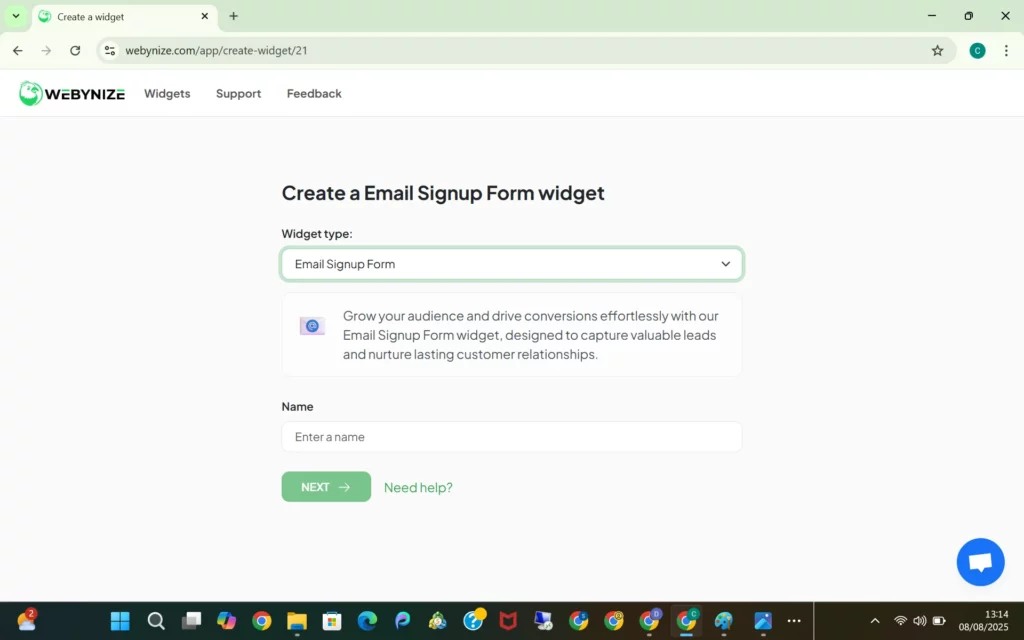
- Open the drop-down menu and select the Email Signup Form widget.

- Input your preferred name for your Email Signup Form widget and click Next to go to the editor panel.
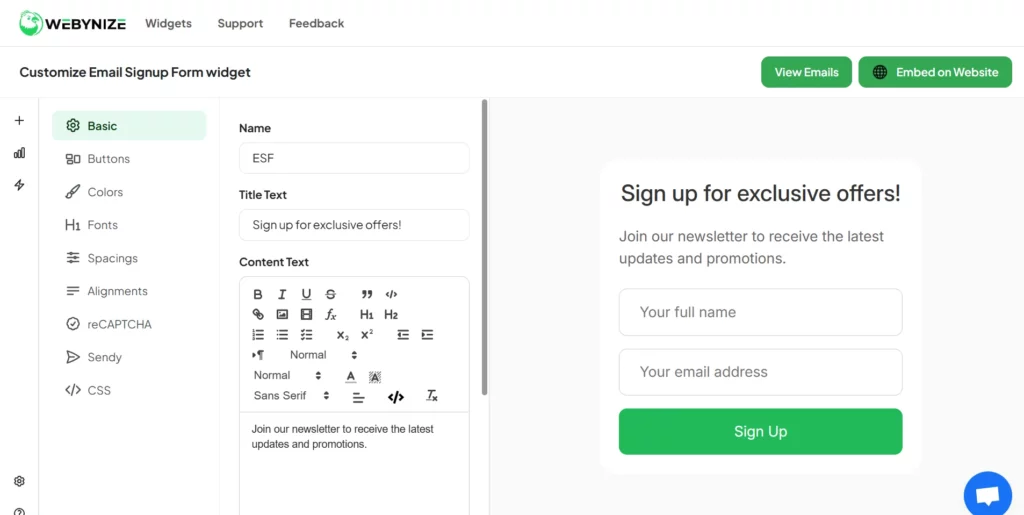
- Craft a compelling call-to-action (CTA) statement to nudge website visitors to join your mailing list. Also, style the Email Signup Form widget to blend with your website theme. Lastly, save the changes to apply your custom settings to the widget.
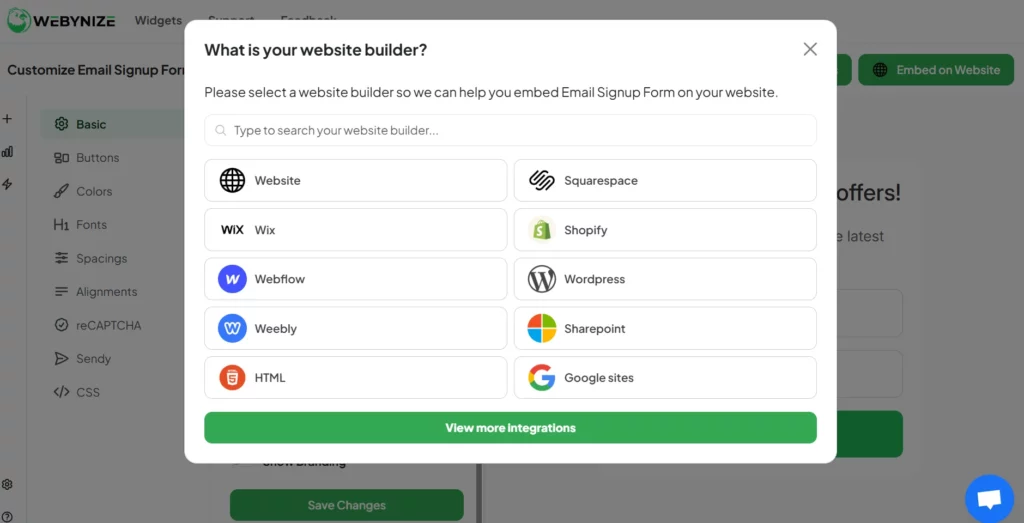
- Click Embed on Website and pick your web builder.
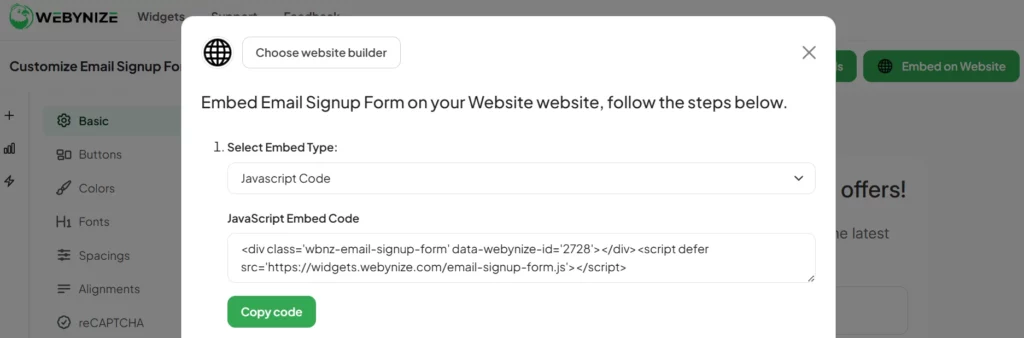
- Select the JavaScript option and click the Copy code button.
Add the Email Signup Form to Your Website
Follow these steps to paste the Email Signup Form embed code to your website:
- Sign in to your web builder and select to create a new web page or edit an existing one where you want the Email Signup form to appear.

- Launch the code editor, rich text editor, or code block section depending on your web builder. Here’s an example for WordPress.

- Paste the Email Signup Form embed code copied from Webynize.
- Save the changes and publish the web page so the feature goes live.
Grow your mailing list using our Email Signup Form widget. We offer flexible monthly plans that cater to different users’ needs. Visit our pricing page.
Sign up for Webynize for a seamless way to gather contact information from high-intent leads!
Video Guide: Embed an Email Signup Form on Your Website for Free
Watch our YouTube video tutorial below for a step-by-step guide on how to integrate an Email Signup Form into your website.
[LIVE-DEMO]
[TESTIMONIALS]
What Is an Email Signup Form and Why It Matters
As the name suggests, an Email Signup Form is a feature on your website that allows visitors to subscribe to a resource, such as a newsletter, upcoming demo, or promotions, using their email address. By filling in and submitting their information, users consent to receiving regular marketing emails.
Below are the key benefits of adding an Email Signup Form to your website:
- Targeted Campaigns: Creating an email list lets you personalize your marketing efforts to individual customer needs. This increases the likelihood that customers will reach out, creating lead conversion opportunities.
- Effective Customer Engagement: An Email Signup Form creates alternative ways to reach high-intent leads and nurture them into paying clients even when they’re not on your website.
- Increased Website Traffic: Customers who sign up may receive offers or promotions that excite them, prompting them to visit your website. This helps increase organic traffic to your site and maintains a consistent flow of visitors.
- Cost-Effective Marketing: Adding an Email Signup Form to your website lets you grow your customer base and send regular newsletters without significant changes in your marketing budget.

Key Elements of a High-Converting Email Signup Form
There’s no one-size-fits-all layout when it comes to designing an Email Signup Form. However, the most effective forms often have several similarities, some of which we’ve discussed below:
- Value Exchange: The Email Signup Form should clearly indicate what users will gain from joining your email list, such as coupons and limited-time offers.
- Call-to-Action Statement: The form should include a compelling CTA guiding users’ next step, which is to subscribe to your email list.
- Strategic Placement: The Email Signup Form should be easily discoverable. Suitable positions include the header, footer, and sidebar, in an area that isn’t cluttered.
- Trust Signals: A high-converting Email Signup Form often provides social proof, such as customer testimonials on how they benefited from the emails, or the number of members on the list.
- Mobile Optimization: A well-designed Email Signup Form should use a mobile-first approach to ensure website visitors have a consistent user experience across devices.

Types of Email Signup Forms
Most web developers categorize Email Signup Forms based on placement, format, and complexity. Here are the key types and their primary characteristics:
- In-Line Forms: These forms are embedded so they become part of the website content. They are considered less intrusive than other types of Email Signup Forms, so they do not hurt your website’s user experience.
- Slide-In Forms: These appear from the side or bottom of the screen based on set triggers like users scrolling below the fold or to a specific section.
- Full-screen Forms: These forms cover the entire website browser window and require user interaction by either subscribing to or closing them.
- Dedicated Landing Page Forms: These are standalone pages whose sole purpose is to collect Email signups.
- Sticky Bar Forms: These forms are fixed at the top or bottom of a web page so they remain visible as users scroll.
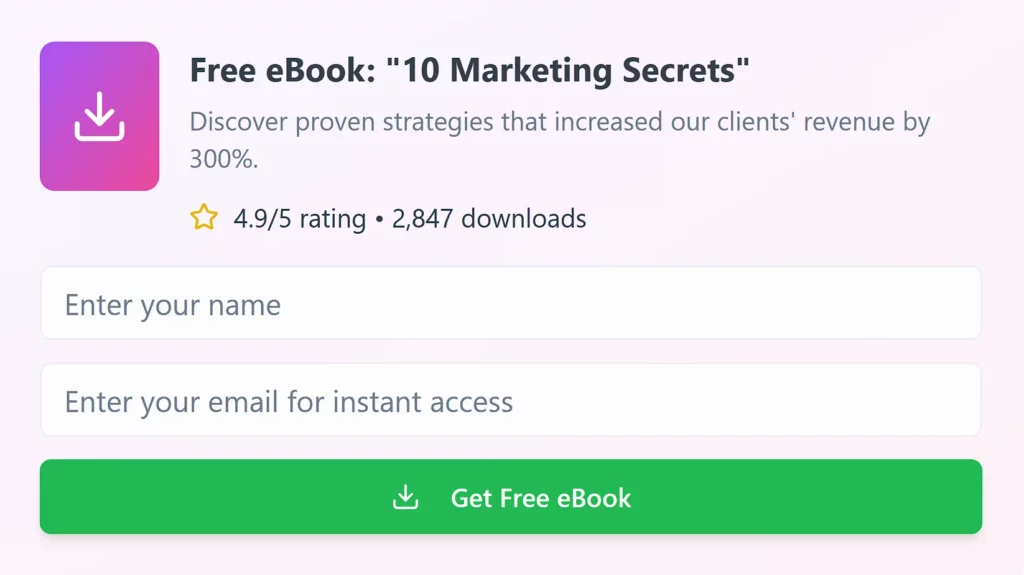
Where to Place Email Signup Forms on Your Website
One way to maximize email signups is by placing the form in a visible and easily discoverable location away from clutter. Below are some placement options to consider when adding an Email Signup Form to your website:
- Above the Fold: Position the Email Signup Form at the top of your web pages where visitors can see it even before scrolling.
- Blog Section: Add Email Signup Forms in the middle or bottom of your articles to maximize subscriptions. The assumption is that visitors who read your blog to at least the mid-section find it helpful, setting the foundation for asking them to join your mailing list.
- Sidebar: Placing an Email Signup Form on your website’s sidebar works the same way as adding a Back-to-Top button on the lower right corner, as visitors almost expect to see it there.
- Footer: Many web users scroll to the footer section to find important links or information about a website. This makes the footer a strategic section to place your Email Signup Form for maximum visibility.
- Exit Intent Pop-Up: Configure the Email Signup Form to appear when users are about to leave your website. Exit intent is often inferred through cursor movements and direction, or switching to other tabs.

Mistakes to Avoid When Creating an Email Signup Form
Do you have significant website traffic but very few email signups? Check whether you’re missing out on new signups because of the following reasons:
- Excess Fields: Creating too many fields often turns off website visitors from signing up. We recommend limiting the Email Signup Form to four fields.
- Unclear Value Proposition: Failing to tell website visitors what they’ll gain from signing up for your email list causes most to ignore the form. Instead, list your unique value proposition, including promotions, discount coupons, and limited offers, to get website visitors interested.
- Unresponsive Design: An unresponsive Email Signup Form often looks cluttered when viewed on smaller screens like mobile phones. This causes mobile users to ignore the signup form or bounce off, losing traffic.
- Lack of Social Proof: Website visitors often need proof that they’ll benefit from joining your email list; otherwise, they might not subscribe. Provide social proof by showcasing the number of users subscribed to your email list next to the form.
- Ignoring Testing and Optimization: Failing to conduct A/B testing results in missed opportunities for refining your email signup form. For example, you might not know that the form sends a spam email to website visitors who sign up, which could tarnish your brand.

Need Support?
This tutorial has helped show you how to add an Email Signup Form widget to your web project for FREE!
If you have questions, click the chat icon at the bottom right to connect with us live. We’ll help you resolve the integration issues step-by-step.
In the rare instances when our support team is offline, email us at [email protected] and expect a response within 24 hours. Describe your integration issues in detail so we can provide a comprehensive solution in a timely manner.
Frequently Asked Questions (FAQs)
This section answers common questions we receive about Email Signup Forms.
What Is the Ideal Length for an Email Signup Form?
There’s no specific answer to how long an Email Signup Form should be. However, the rule of thumb is that it should be short to encourage website visitors to complete the sign-up process. As such, we recommend a maximum of 3 or 4 fields, focused on collecting visitors’ names, email addresses, and other relevant information.
How Do I A/B Test Signup Forms Without a Developer?
You can perform A/B testing on signup forms without a developer by using Google Analytics, Unbounce, and Optimizely. These tools let you create different versions of your form and track conversions to determine the most user-friendly layout.
How Do I Reduce Spam Signups?
The most effective ways to reduce spam signups are:
- Honeypots: Create fields that only bots can ‘see’ and fill.
- Rate Limiting: Restrict the number of registration attempts from a specific IP address or device.
- Spam Prevention Tools: Use tools like CAPTCHA and email verification to filter signups from bots.
Conclusion
Adding an Email Signup Form is a simple yet effective way to grow your email list, creating more lead generation opportunities for your business. Even better, you can add the Email Signup Form without writing any code.
Webynize lets you create an Email Signup Form compatible with major web builders, including HTML, SharePoint, Shopify, WordPress, and Squarespace. Also, you can customize your Email Signup Form to match your website theme.
Create a Webynize widget today for a seamless way to grow your email list!
Leave a Reply